Required Permissions Explained
When you invite Wallu to your server, Discord asks you to grant certain permissions. Here's an honest breakdown of why each permission is needed and what features won't work without it.
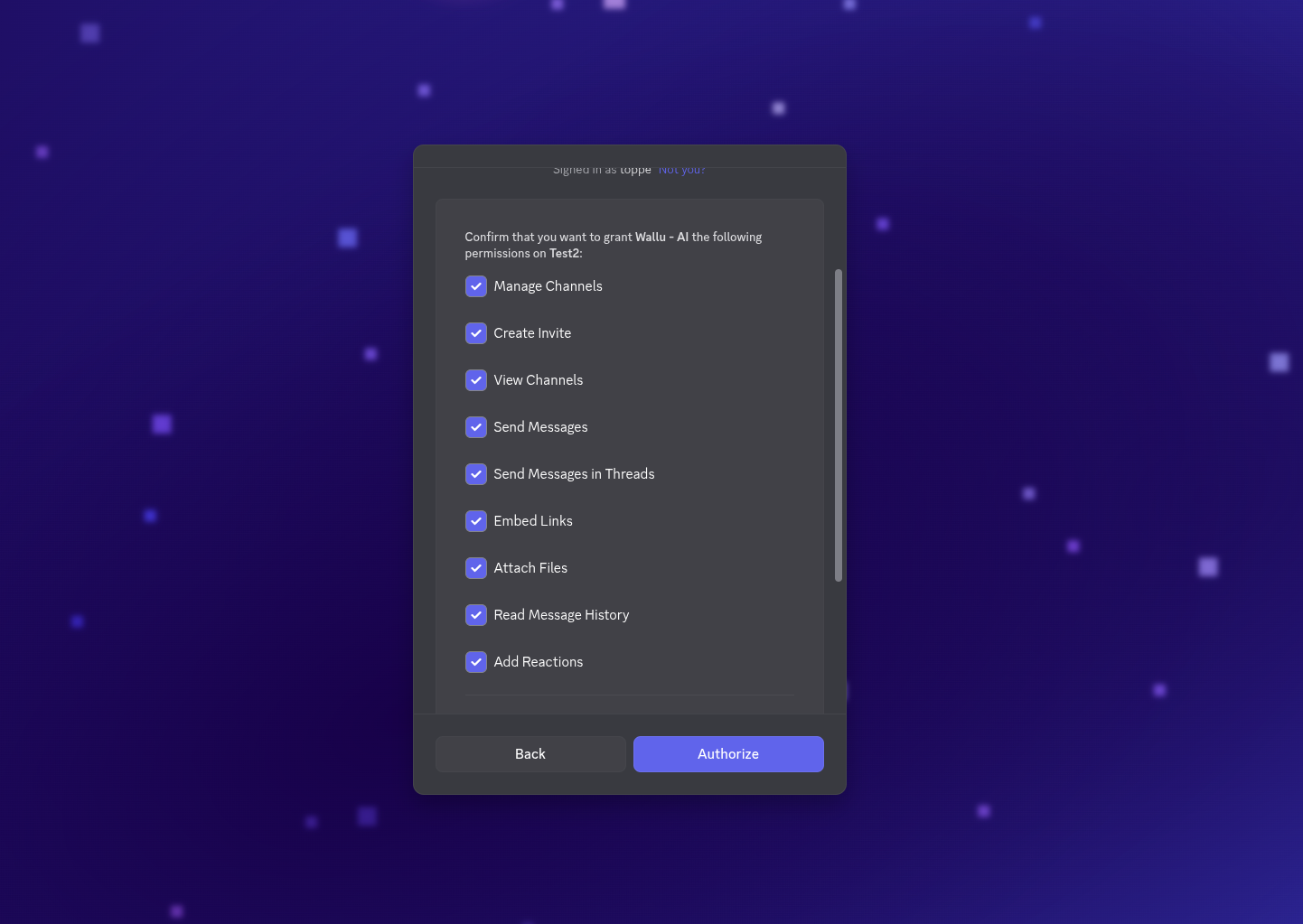
Permission Breakdown
View Channels
Why needed: Wallu needs to see channels to read questions and provide answers. Without this, the bot is completely blind to your server.
What breaks without it: Everything - Wallu can't function at all in channels it can't see.
Send Messages
Why needed: The core functionality - responding to user questions with helpful answers.
What breaks without it: Wallu can read questions but can't respond to them.
Send Messages in Threads
Why needed: Many servers use threads for support conversations. This permission lets Wallu help users in thread-based discussions.
What breaks without it: Wallu ignores all threads, even if it could help.
Embed Links
Why needed: Wallu uses Discord embeds for formatted responses - showing source links, FAQ references, and structured answers that are easier to read.
What breaks without it: Responses become plain text without proper formatting or clickable links.
Attach Files
Why needed: Sometimes Wallu needs to share images or files as part of an answer, especially when explaining visual content from your knowledge base.
What breaks without it: Wallu can't include images or attachments in responses.
Read Message History
Why needed: Wallu reads previous messages to understand conversation context. This helps it give relevant answers based on what was discussed before - not just the last message. Additionally, Wallu uses this to import your existing channels (e.g., #faq) as a knowledge source.
What breaks without it: Wallu loses conversation context, may give less relevant answers, and can't import messages from your existing channels.
Add Reactions
Why needed: Wallu uses reactions for feedback collection (thumbs up/down on answers) and to acknowledge messages in certain modes.
What breaks without it: No feedback collection, which means you lose insights on answer quality.
Manage Channels
Why needed: Wallu can create dedicated channels like #wallu-knowledge for setup and configuration. This is optional - Wallu works fine without it in existing channels.
What breaks without it: Automatic channel creation for Wallu-specific features. You can manually create channels instead.
Create Invite
Why needed: Used for generating server invite links when needed for support or diagnostics. Rarely used in practice.
What breaks without it: Minor - only affects specific diagnostic features.
Channel-Level Permissions
Discord permissions work at two levels: server-wide and per-channel. Even if Wallu has server-wide permissions, channel-specific overrides can block access.
Common issues:
- Private channels that explicitly deny bot access
- Category permissions overriding server defaults
- Role hierarchy conflicts
To check: Right-click a channel → Edit Channel → Permissions → Check Wallu's role permissions.
Minimal Permission Setup
If you want to grant only essential permissions:
- View Channels - Required
- Send Messages - Required
- Read Message History - Highly recommended
- Embed Links - Recommended for better formatting
- Attach Files - Recommended for image responses
Everything else is optional but recommended for the best experience.
Troubleshooting Permission Issues
If Wallu isn't working:
- Type
!walluin the channel - if this fails, it's definitely a permissions issue - Check that Wallu's role isn't below other roles that deny permissions
- Verify channel-specific permissions aren't overriding server defaults
- Re-invite Wallu with full permissions using wallubot.com/invite
Need help? Join our Discord community or contact [email protected].