Meet Your New Onboarding Buddy: The Wallu Setup Agent

Setting up a support bot shouldn't feel like a part-time job. Usually, it involves jumping between Discord and a web dashboard, copying IDs, and trying to figure out which setting does what.
We wanted to change that. Today, I'm excited to introduce the Wallu Setup Agent (currently in Beta).
Your AI Onboarding Assistant
The Setup Agent is a dedicated assistant that lives right inside your Discord server. When Wallu joins a new server, it automatically creates a private #wallu-setup channel.
Instead of searching through documentation or clicking through tabs in a dashboard, you can just talk to the agent. It's designed to be your hands-on onboarding buddy, helping you get everything running in minutes.
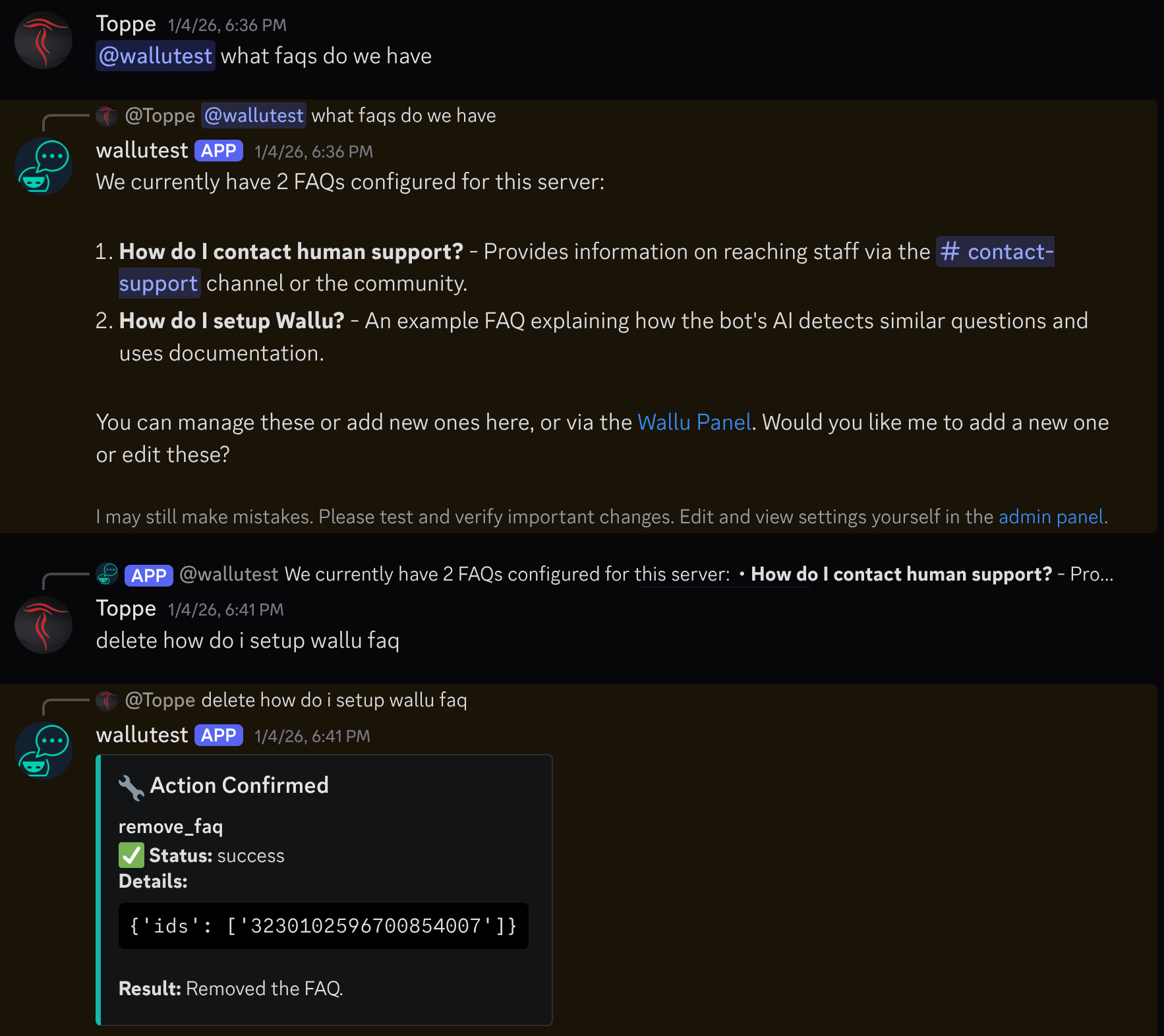
What can it do?
The agent has access to the most common configuration tools. You can ask it to do things like:
- Import Knowledge: "Can you import our #rules and #announcements channels as documentation?"
- Manage FAQs: "Add a new FAQ: How do I get a refund? Answer: Check the #refunds-policy channel for details."
- Change Settings: "Make the bot respond only when mentioned" or "Do not respond to staff members."
- Troubleshoot: "Why isn't the bot answering my questions in #general?" (The agent can check your settings and explain why it might be staying silent).
Why we built it
At Wallu, our philosophy has always been about Integration, Not Replacement. We know that community managers and developers spend most of their time in Discord. Every time you have to leave your "home" to configure a tool, it breaks your flow.
The Setup Agent keeps you where you are. It’s built to understand your current server configuration and help you improve it through simple conversation.
Safety and Control
We know that giving an AI power over your bot settings might sound a bit scary. That's why we've built in several safeguards:
- Staff-Only: The
#wallu-setupchannel is private and only accessible to authorized staff. - Confirmations: Sensitive changes (like deactivating documents or changing core bot behavior) require human approval. The agent will ask you to confirm before the change actually goes live.
- Transparency: The agent explains why it's making a change and what the impact will be, so you're always in the loop.
Update (July 2026): No setup channel? Just type /wallu-help
The #wallu-setup channel only appears when Wallu has the Manage Channels permission - and a lot of you (very reasonably) invite the bot with fewer permissions. So we made the agent reachable without any channel at all: type /wallu-help and describe what you want.
/wallu-help request: Disable yourself in #general
/wallu-help request: Add an FAQ explaining how to appeal a ban
The reply is private (only you see it), every change shows a Confirm button before it's applied, and you can continue the conversation with the Reply button. By default the command is Administrators-only; you can open it up to other roles in Server Settings → Integrations → Wallu. Applied changes are also posted to your staff notifications channel so the rest of your team stays in the loop. See the command reference for details.
Getting Started
If you're already using Wallu, you might have already noticed the #wallu-setup channel appear. If not, try the /wallu-help command, invite the bot to a new server, or check your existing setup.
It's still in Beta, so it might not be able to do everything just yet (some complex integrations still need the web dashboard), but it’s getting smarter every day. If it ever hits a limit, it'll point you to the right place in the dashboard or suggest reaching out to our support team.
We'd love to hear your feedback! Join our Discord community and let us know how the Setup Agent is helping you save time.
You can still manage Wallu in the admin panel: https://panel.wallubot.com
Want to see the Setup Agent in action? Invite Wallu to your server and say hi in the #wallu-setup channel.