
3 posts tagged with "integration"

View All Tags

Wallu Now Reads Your Code: Introducing GitHub Integration & Deep Search

· 4 min read
Topias
Wallu's Developer

If you maintain software, a mod, a plugin, or an open-source library, you know that documentation rarely covers everything. Users often ask questions that require you to open your IDE, search for a config key, trace where it's used, and figure out exactly how a specific edge case is handled.

"What is the default value for max_connections?" "Why does the on_join event fire twice?" "Does the legacy API still support XML?"

Your documentation might not say. But your code does.

Today, we're introducing GitHub Integration and Deep Search – a new capability that lets Wallu investigate your codebase directly to answer complex support questions.
Most AI support bots work by "semantic search" (RAG). They find a relevant paragraph in your uploaded PDFs or website and summarize it. This works great for general questions, but falls apart when the answer lies in the logic of your application.

Wallu's new Deep Search is different. It's not just a search engine; it's an autonomous investigation agent.

When a user asks a question that your documentation can't answer, but you have added a Git repository as a knowledge base, Wallu can now:

  1. Search your repository for relevant keywords (config names, error codes, class names).
  2. Read the actual code to understand logic, default values, and validation rules.
  3. Trace dependencies to see how one setting affects another.
  4. Synthesize an answer based on how the code actually behaves, not just what the docs say.

Real-World Use Cases

We built this feature specifically for software projects, game servers with custom plugins, and developer communities.

1. The "Undocumented Setting" Mystery

User: "I set buffer_size: 5000 but it's still slow." Wallu (investigating): Searches for buffer_size. Finds it in config.py. Sees a line: self.buffer = min(value, 4096). Wallu Answer: "Even though you set buffer_size to 5000, the code actually caps this value at 4096 internally. You might need to adjust the MAX_BUFFER constant if you need higher values."

2. The Specific Error Trace

User: "I'm getting Error 502: Bad Gateway when uploading large files." Wallu (investigating): Greps for "Bad Gateway". Finds the exception handler in upload_service.js. Notices it triggers when the timeout is reached. Wallu Answer: "This error usually occurs because the upload exceeds the default timeout. The code indicates this happens in the upload service when processing takes too long."

3. Feature Compatibility

User: "Does the new version support the old permission system?" Wallu (investigating): Checks the permissions/ directory. Finds a LegacyPermissionAdapter class. Wallu Answer: "Yes, it appears the legacy permission system is supported via an adapter layer, so your old configurations should still work."

Privacy & Security First

We know your code is sensitive.

  • Private Repositories: You can connect private GitHub repos. Wallu accesses them securely with your authorization and includes guardrails designed to prevent outputting sensitive information like secrets (though you should avoid storing sensitive data that it shouldn't use in answers).
  • Safety Guardrails: The agent is instructed to explain how things work or why an issue occurs, without revealing sensitive information.
  • Access Control: You choose exactly which repositories Wallu can see.

How to Get It

This feature is currently in Beta.

We are rolling it out gradually to ensure it scales well and provides accurate results. If you are a software maintainer, modder, or developer using Wallu for support, this is designed for you. Currently, Wallu uses this feature sparingly to handle complex questions that can't be answered from documentation alone.

You can connect your GitHub repository in the Wallu Dashboard under Your Documents -> Add Knowledge Document.

Note: As this is a beta feature, we're actively tuning the investigation logic. Join our Discord to share your feedback!

Your Discord AI Just Escaped to Your Website (And That's Amazing)

· 4 min read
Topias
Wallu's Developer
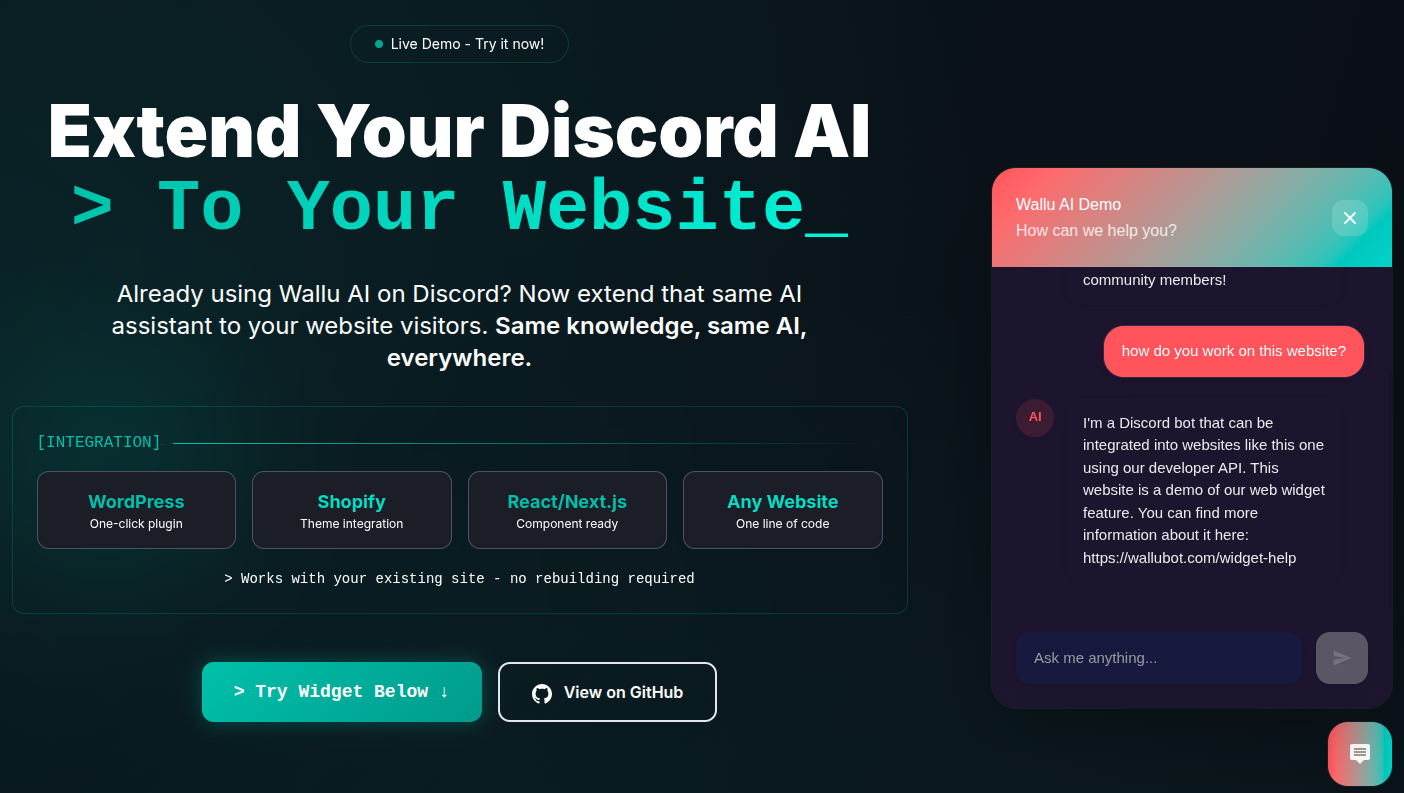
Wallu web widget in action on a website

Your Discord AI assistant is doing amazing work - answering questions, helping members, and becoming smarter every day. But what if that same intelligence could help visitors on your website too?

Today, we're launching something that bridges that gap: Wallu Web Widget. Your Discord AI can now escape the matrix (Discord) and provide the same intelligent support directly on your website.

Same Brain, New Location

Here's what makes this different from every other chat widget out there: it's the same AI that's helping your Discord community.

No separate setup & bills. No duplicate knowledge bases. No maintaining two different systems. Your Discord AI simply extends to your website with all the intelligence it's already built up.

When someone asks a question on your website, they're getting answers from the same knowledge base that you've refined through hundreds of Discord conversations. It's like having your most knowledgeable community member available 24/7 on your website.

Ultra-Simple Setup (Because We Hate Complicated Things)

Remember the days when adding a chat widget meant wrestling with APIs, setting up servers, and praying nothing breaks? We don't miss those days either.

Setting up the Wallu Web Widget takes less than a minute:

Option 1: CDN (No Downloads Needed)

<script>
// Configure your API key BEFORE loading the widget
window.WALLU_CONFIG = {
apiKey: 'pk_your_actual_key_here', // 🔑 REQUIRED: Get from https://panel.wallubot.com/addons
theme: 'gaming',
}
</script>
<script defer src="https://wallubot.com/wallu-widget.js"></script>

Option 2: Fully Customizable (Download the File)

  1. Download the widget file from the GitHub repository
  2. Edit the file and add your public API key there
  3. Place it on your server (e.g., public directory, next to your index.html)
  4. Add this to your HTML, adjusting the path to where you placed the file:
<script src"./wallu-widget.js"></script>

That's it. Your Discord AI is now live on your website.

Also, as it's just one file you can very easily ask any AI (ChatGPT or Claude) to edit it for you!

Built for Real Websites

We've tested this on everything from simple HTML sites to complex React applications. WordPress? Check. Shopify? Check. That custom Next.js site you built at 3 AM? Also check.

The widget includes:

  • 5 built-in themes (Discord, corporate, tech, gaming, minimal)
  • Mobile responsive design because half your visitors are on mobile
  • Custom branding options to match your site perfectly
  • Discord webhook logging to track website conversations in one place on Discord

The Security Question Everyone Asks

"Is it safe to put my API key in frontend code?"

Yes - when you use public API keys (the ones starting with pk_). These keys can only send messages to your AI, just like a user would in Discord. They can't modify settings or do anything potentially harmful.

Think of it like giving someone permission to ask your AI assistant questions - which is exactly what website visitors should be able to do.

Perfect for These Communities

If you run any of these, the web widget is probably going to save you a lot of time:

  • Gaming communities with websites that need consistent support
  • SaaS products using Discord for community support
  • Content creators with both Discord and website presence
  • Any business that's built up knowledge in Discord and wants to share it

Customize Behaviour

You may want it to behave slightly different on your website. For example, link to your Discord for more complex questions etc. You can do that on the Wallu's Channels Page by selecting your web widget channel and editing the settings. The channel will appear there once first message is sent from the widget.

In the custom instructions for the web widget you can add, for example:

- IMPORTANT: You are now responding on our WEBSITE, not on Discord!
- If you cannot help the user, refer them to join our Discord server https://discord.gg/yourserver
tip

Add discordWebhook: true and it will log all website conversations to your configured Discord channel.

Getting Started

The fastest way to see this in action? Check out the demo. You'll see exactly how it would look on your website.

Ready to extend your Discord AI to your website? Grab your public API key from the Wallu Panel, download the widget, and you're 30 seconds away from having intelligent website support.

Your Discord community built up all that knowledge - now let your website visitors benefit from it too.

Try it yourself: Web Widget Repository

How BottingHub Built a Web Support Widget in 30 Minutes With Wallu

· 3 min read
Guest Author
Guest Author
Discord Community Owner

Ever wonder how fast you can add smart AI support to your website? BottingHub.com, long time client of Wallu in the gaming industry, just showed us a non technical person could do it in 30 minutes - and they're not even tech experts.

The Challenge

BottingHub was already using Tawk.to for their website chat but didn't want to pay for multiple subscription services. They needed a simple way to add AI support to their WordPress site without breaking the bank.

When they asked about WordPress integration, we told them about Wallu's developer API. The response? "I'm not a tech guy at all" - but they decided to try anyway.

The Solution: Claude + Wallu API

Here's what happened next - they opened Claude AI and simply asked it to build a web widget using Wallu's API and provided the [developer API example from our documentation](developer API example from our documentation). That's it. No hiring developers, no complex planning, just a simple conversation with AI.

In 30 minutes, they had a working widget that could:

  • Answer customer questions about their gaming related services
  • Use their existing Discord knowledge base
  • Work seamlessly on their WordPress site
  • No other platform, extra subscriptions, or complex setups required

BottingHub Widget

Why This Works So Well

Wallu's developer API is built to be simple. The example code we provide is basically all developers need to understand. Here's what made this possible:

  1. Clear API documentation - One example shows exactly how to integrate
  2. Simple setup - Just get an API key and enable the addon
  3. Works anywhere - HTML, WordPress, Game, Telegram, any platform really
  4. No subscription juggling - Use your existing Wallu setup
  5. No extra costs - Even free version of Wallu works with the API

The Result

"I'm surprised that Claude actually got it to work" - that was their reaction when they saw it running. But honestly, we're not surprised at all. When you design an API to be this simple, good things happen.

BottingHub now has smart AI support on their website without:

  • Paying for multiple services
  • Managing different knowledge bases
  • Hiring developers
  • Spending weeks on integration

What This Means for You

If a self-described "non-tech guy" can build a working AI widget in 30 minutes, what could you do with Wallu's API? Whether you're running a gaming site, e-commerce store, or any business that needs smart support, the barrier to entry is basically zero.

The API works the same way as our Discord bot - it's just Wallu answering questions, but now anywhere you want it to.

Ready to try it yourself? Check out our developer API docs and see what you can build in 30 minutes.


Want to share your own Wallu success story? Let us know - we'd love to hear how you're using our API.