Website Chat Widget
Add your Discord AI assistant to any website with the Wallu web widget. It uses the same knowledge base as your Discord bot, so there's no extra setup or "training" needed.
Quick Setup
Option 1: CDN (Recommended - updates automatically)
- Get your public API key from Wallu Panel - Addons
- Add to your website:
<script>
    window.WALLU_CONFIG = {
        apiKey: 'pk_your_actual_key_here',
        // Built in themes are: 'discord', 'corporate', 'tech', 'gaming', 'minimal'
        theme: 'discord'
    };
</script>
<script defer src="https://wallubot.com/wallu-widget.js"></script>
Option 2: Download & Configure (In case you want to customize the Wallu's web widget)
- Download
wallu-widget.jsfrom the GitHub repository - Edit the
WALLU_CONFIGsection in the file - Upload to your website and include:
<script defer src="./wallu-widget.js"></script>
Configuration Options
window.WALLU_CONFIG = {
    apiKey: 'pk_your_key_here',           // Required
    theme: 'discord',                     // discord, corporate, tech, gaming, minimal
    botName: 'AI Assistant',
    headerSubtitle: 'AI assistant - replies are automated',
    welcomeMessage: 'Hi! I\'m an AI assistant. How can I help?',
    position: 'bottom-right',             // or bottom-left
    discordWebhook: true                  // Log conversations to Discord
};
The default bot name, header subtitle and welcome message all state that the visitor is chatting with an AI. If you customize them, keep that clear - the EU AI Act (art. 50) requires people to be told when they're talking to an AI instead of a human.
Platform-Specific Setup
WordPress - Install Wallu web widget
Use "Insert Headers and Footers" plugin and add the CDN code to the footer.
Shopify - Install Wallu web widget
Upload the widget file to theme assets and reference it in layout/theme.liquid.
React/Next.js - Install Wallu web widget
useEffect(() => {
    window.WALLU_CONFIG = { apiKey: 'pk_your_key_here', theme: 'discord' };
    const script = document.createElement('script');
    script.src = 'https://wallubot.com/wallu-widget.js';
    script.defer = true;
    document.body.appendChild(script);
}, []);
Customization
Custom Instructions
Configure different behavior for your website in Wallu Panel - Channels. The web widget channel appears after the first message is sent.
Example web-specific instructions:
- You are responding on our WEBSITE, not Discord
- If you cannot help, refer users to join our Discord: https://discord.gg/yourserver
Security
- Use public API keys (starting with
pk_) - safe for frontend use - Public keys only allow sending messages, not modifying bot settings
- Built-in rate limiting protects against abuse
Restrict which knowledge the widget can reach
By default the widget can reach all of your bot's knowledge - usually what you want, the same answers on your site as in Discord.
But a public key is visible in your page source, and each request's channel.id and addon.name are just claims from whoever holds
the key. So if you restrict some FAQs or documents to a specific channel or addon, someone could copy your key, send a different
channel.id/addon.name, and pull that restricted knowledge onto their own page.
The widget claims channel.id = the current page path (e.g. /support) and addon.name = web-widget (yourdomain.com) (or the
channelId/addonName you set in WALLU_CONFIG). To lock the key to only what the widget sends, edit the public key on the
Addons page under Restrict knowledge:
- Allowed channels - e.g.
/*to allow any page on your site (this alone blocks anyone claiming a real Discord channel id) - Allowed addons - e.g.
web-widget (yourdomain.com)
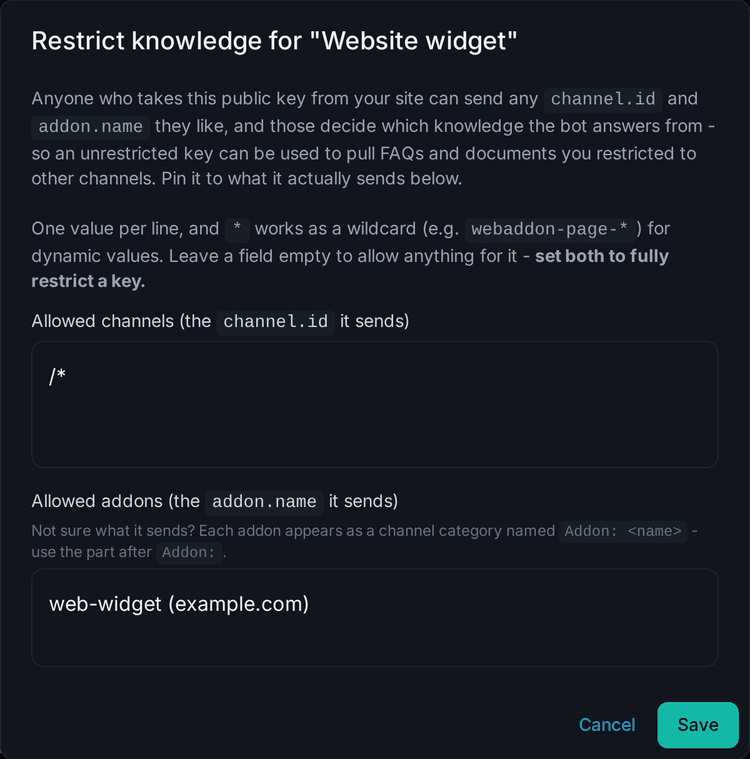
* is a wildcard. Set both to fully lock a key; leaving one empty allows anything for it, and requests outside the allowed values
are rejected with 403. If you don't restrict any FAQs/documents per channel, you don't need to set this - there's nothing extra to
unlock.