Organizing Discord Tickets with AI Auto-Renaming

Managing a high-volume support server often leads to a sidebar cluttered with generic channel names like #ticket-4821, #ticket-5930, and #ticket-2104. While functional, these
names don't provide much context for staff members trying to prioritize their workload.
To help with this, we've introduced AI Ticket Renaming—a feature that allows Wallu to rename ticket channels based on the topic of the conversation.
From Generic IDs to Descriptive Topics
Wallu can automatically update your ticket channel names to reflect what the user is actually asking about. This gives your staff a better overview of active issues without needing to open every ticket:
#ticket-4821→#toppe-refund-request#ticket-5930→#user99-setup-issue#ticket-2104→#dev-api-question
How It Works
Wallu waits until it has enough context to identify the core issue. Once the user has stated their problem and Wallu understands the topic, it updates the channel name to a clean, hyphenated slug.
The bot follows a predictable format (typically <username>-<topic>) to ensure consistency while keeping the sidebar readable.
Practical Benefits for Staff
- Instant Context: See what each ticket is about at a glance.
- Easier Navigation: Quickly find the ticket you were previously handling.
- Improved Prioritization: Identify urgent topics like "payment-issue" or "access-bug" immediately.
Customizing the Naming Logic
Every server has different needs, so we've added Auto-Rename Instructions. This allows you to give Wallu specific guidance on how it should format the names.
For example, you might want it to include specific prefixes or ensure certain keywords are always used.
Example instructions:
"Include username if known. Example ticket name: toppe-vote-rewards-issue"
Setup
AI Ticket Renaming is available for all Wallu users with ticketing enabled. To enable it:
- Open your Wallu Dashboard.
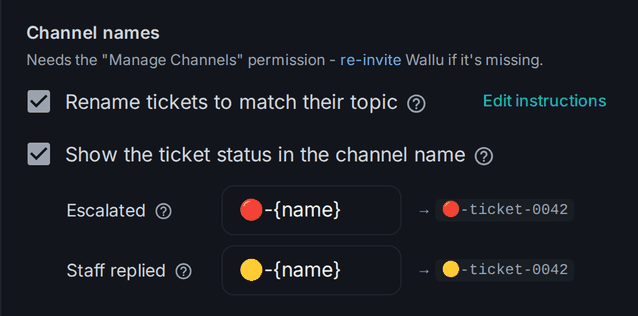
- Go to Bot Settings -> Ticket System Mode -> Channel names.
- Enable Rename tickets to match their topic.
- (Optional) Click Edit instructions to fine-tune the naming.
The same section can also mark tickets that need staff in the channel name (🔴-ticket-0042), see Ticket Automation.
Please ensure Wallu has the Manage Channels permission so it can update the names.
Use the search function in the panel to find settings!
Want to improve your support workflow? Check out Wallu and see how it can help organize your community.