FAQs
FAQs are hand-written question/answer pairs. Wallu checks them first, so a matching FAQ always wins over documents - which makes them the most predictable source and ideal for answers that must be exact (or to override what a document says).
Wallu's document search is very accurate, so you don't have to write an FAQ for every question. If you mostly want to keep answers easy to update, a #wallu-knowledge channel or an imported website is usually less work. Use FAQs for the handful of answers that need exact wording.
FAQS - Youtube Tutorial
Adding FAQs
-
Go to the FAQs page in the admin panel and find the Add a new FAQ form.
-
Type an example question in the Questions (one per line) field. Wallu's AI will match this question to the user's question. Put each different phrasing on its own line.
-
Type the answer in the Answer field.
-
Click Save
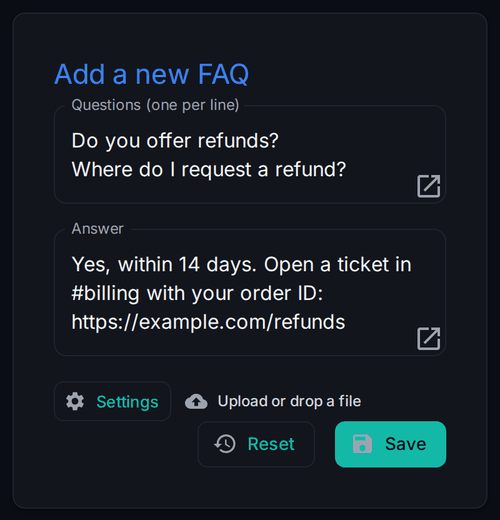
-
Go to the Discord channel and ask the question you just added. Wallu should answer with the answer you added.
- If Wallu is not answering, test
!walluto see that it can read and send messages. It may also say why it's not answering your question.
- If Wallu is not answering, test
-
You can now try paraphrasing the question and see if Wallu can still answer it. E.g., "How to add a FAQ?" -> "how can I add new FAQs?"
-
Make sure Advanced FAQ AI is enabled to make Wallu better at understanding questions. It may take a few seconds to process.
FAQS - Best Practices
- Start with common questions that your users already ask frequently. You can always add more FAQs later.
- Use full sentences as example questions. This helps Wallu understand the context better.
- Use links in the answer to link to your web page that contains the details. For example, your plans page if the question is about pricing.
- This way the answer will not get outdated, for example, if you change your pricing.
- Linking to a page will more likely answer any follow-up questions you otherwise did not think of.
- Don't over-complicate it and don't try to make it too smart.
- Simple questions and answers or links to more information are usually better than trying to make it too smart.
- Don't try to cover every possible question. It's best to start with the most common questions you already get.
- Add multiple questions for better coverage. Even though the AI is good with synonyms, it's beneficial to list multiple different
questions.
- For example, "do you offer refunds?" and "where do I request a refund?". However, no need to list too similar questions like "where can I track my order?" and "how can I track the order?".
FAQS - Advanced Tips
- Use to create commands: You can add
"!pricing"as the question and staff can use this command as a shortcut to trigger the answer. - Markdown: You can use markdown in the answer field to make the answer look better. For example, you can use
**bold**to make text bold. - Markdown links: You can use markdown links to link to other FAQs or documents. For example,
[example link](https://example.com)will create a link to this FAQ. - Link channels: You can mention channels either by just using #channel or by using
<#channel-id> - Exact match text: You can use quotes to exactly match specific text. For example,
what does error "404" mean?will only match the question with the "404" text. - Images and files: Upload a file on the File Attachments tab and paste its
<attachment id="..." alt="...">tag into the answer - Wallu then sends the screenshot or PDF along with it. See Data, Files & Bulk Tools. - Mass editing: You can edit multiple FAQs at once here, and import a whole page of documentation as FAQs at once.
- Changing minimum confidence: You can increase (if it answers too often) or decrease (if it answers too rarely) the minimum confidence for each FAQ. However, we recommend keeping the default minimum confidence.
- Verified answers: when an FAQ matches directly, Wallu sends your answer as written and tags it
Verified✓(editable on the Messages page). - FAQ limit: your plan sets how many FAQs you can have. If you're at the limit, move the long-tail answers into a document - there's no per-question limit there.