Git Repositories & Deep Search
If you maintain software - a plugin, a mod, an API, a game server - your documentation never covers everything, but your code does. Wallu can import a Git repository as a knowledge source and investigate it when a question can't be answered from your normal documentation.
Repository documents and Deep Search are in beta. Deep Search is used sparingly (it is far more expensive than a normal answer), so don't expect it on every question. Feedback is welcome in our Discord.
Add a repository
- Go to Documents → Add Knowledge Document → Git Repository.
- Enter the Repository URL ending in
.git, optionally with a branch:https://github.com/user/[email protected] - Private repository? Paste a GitHub Personal Access Token. It is stored encrypted. Use a read-only, least-privilege token.
- Save (you're asked to confirm that Wallu may use the repository's content), then click Test Connection to confirm Wallu can reach the repository.
- Choose which channels may use the document, like any other document.
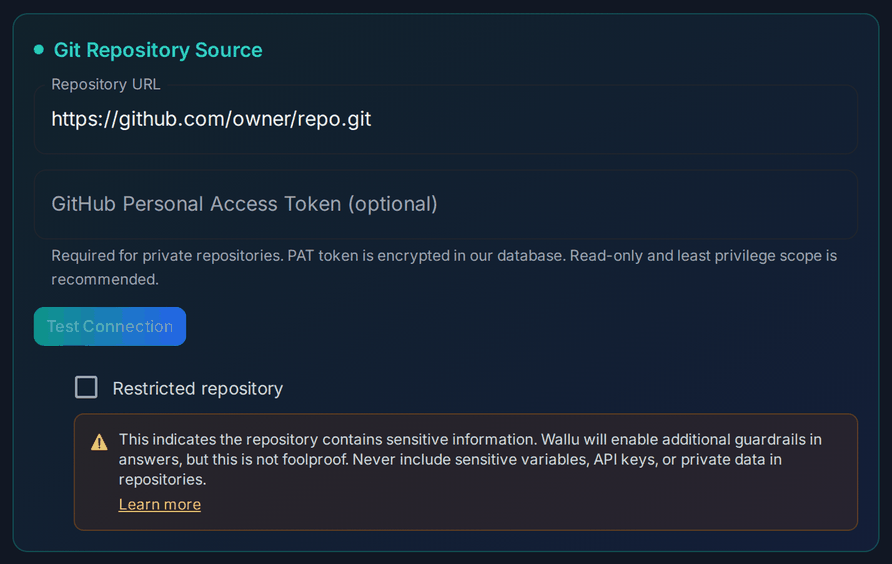
Restricted repositories
Tick Restricted repository if the code contains anything you'd rather not see quoted back. Wallu then applies extra guardrails and is more careful about what it reveals.
Guardrails are not a security boundary. Never keep secrets, API keys, credentials or private customer data in a repository you connect - assume anything in it can influence an answer.
What Deep Search does
Normal answers work by searching your documents for relevant passages. Deep Search is different: it's an agent that investigates the repository before answering. It can search the code for a config key or error string, open the files it finds, follow how a value is used, and then answer from how the code actually behaves.
That's what makes it useful for questions like:
- "What's the maximum value for
buffer_size?" - the docs don't say, but the code caps it. - "Why do I get
Error 502when uploading?" - the handler shows which timeout triggers it. - "Does the old permission format still work?" - there's a legacy adapter in the code.
Wallu decides on its own when a question is worth investigating; there's no command for it. It also needs a comfortable credit balance, so it's skipped when your monthly credits are running low (see Credits & Usage).
Tips
- Repository quality is answer quality. A tidy repo with a real README and clear naming produces far better answers than a sprawling one.
- Keep your normal documentation too. Deep Search complements documents, it doesn't replace them - most questions should still be answered straight from your docs, which is faster and cheaper.
- Public repos need no token. Only private ones do.
- If you'd rather push content yourself (for example only the
*.mdfiles in a repo), the Developer API has a GitHub Actions example that syncs files as normal documents on every push.