Reading Images & Screenshots
Support questions often come as screenshots - an error dialog, a settings page, a receipt. Wallu can look at those images and use what it sees when answering. Both options live in the General Configuration card in Settings.
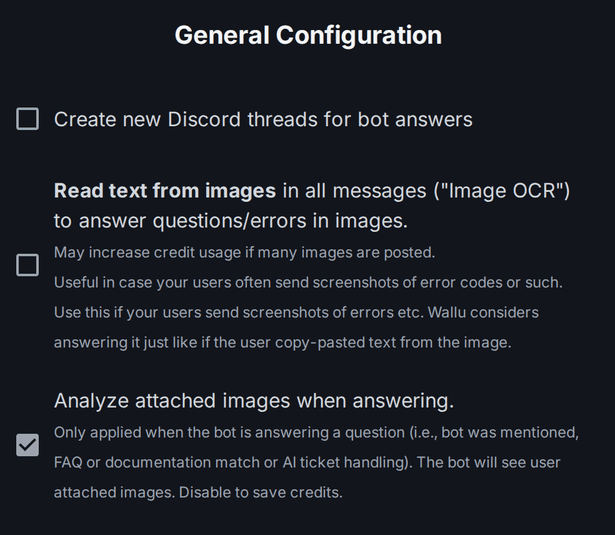
Image analysis
Setting: Analyze attached images when answering.
What it does: when Wallu is answering (e.g. when mentioned), it looks at attached images and uses them as context - reading text, understanding screenshots, and describing what's shown.
Recommended: on. It lets Wallu actually see the screenshot a user is asking about. Turn it off only to save credits.
Image text recognition (OCR)
Setting: Read text from images in all messages ("Image OCR").
What it does: reads text from images in all messages, not just when Wallu is mentioned. If a user posts a screenshot of an error that matches your docs or an FAQ, Wallu can answer as if they'd typed the text out.
When to enable: if your users frequently paste screenshots of errors. It can increase credit usage when lots of images are posted, so weigh that against how often it helps.
Video transcripts
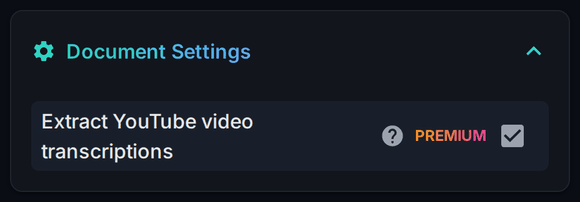
When a document contains a YouTube link, Wallu pulls the video's transcript into that document and answers from it. Handy when your best explanation lives in a video rather than in text - paste the link into a text document (with a line of context about what the video covers) and it becomes searchable knowledge.
Requires a paid plan, and it's on by default there. Turn it off on the Documents page under Document Settings → Extract YouTube video transcriptions if you'd rather Wallu ignored linked videos.
Sending images back
Wallu can also send images: upload a screenshot on the File Attachments tab and reference it from an FAQ or document. See Data, Files & Bulk Tools.